
eBrain System Utility
Firmware Updater
Check the connected eBrain, verify that it is on firmware 4.1 or newer, and then move into browser-based flashing without leaving the same visual system as the rest of the device tools.
USB WebSerial firmware check
4.1+ required baseline
Not checked
Required firmware 4.1+
Press Check Firmware Version to request get_info from the connected eBrain.
Detected Firmware-
Device Name-
MAC-
IP-
Boot Prep
Prepare The Board
Connect Pin0 to GND before powering on the eBrain. That puts the board into BOOT mode so the browser flasher can take over cleanly.
After flashing, remove the jumper and reboot the board normally before returning to the workspace.
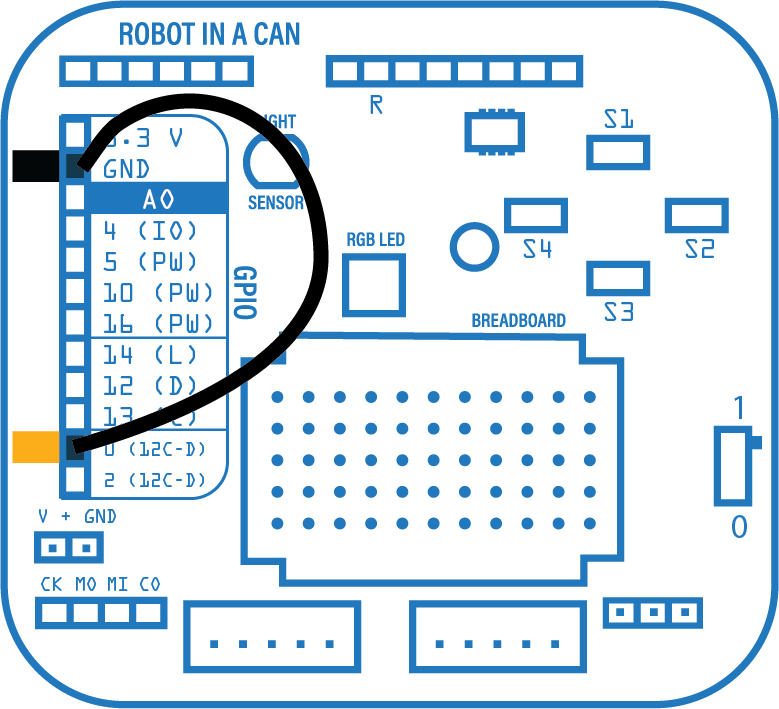 Ground GPIO0 before power-up to enter BOOT mode, and leave the power switch at 0 for USB flashing.
Firmware Choice
Select Image
Installer
Flash Firmware
The install button appears once a firmware target is selected.